
If you run an online store and your products are not showing up on Google, you are losing sales every single day. The good news? You do not need to be an SEO expert to fix that.
E-commerce SEO is the process of optimizing your online store so that search engines like Google can find it, understand it, and rank it higher than your competitors. When done right, it brings a steady stream of free, organic traffic straight to your product and category pages without spending a single rupee on ads.
In this guide, we will walk you through 10 proven, practical tips to improve SEO for your e-commerce website in 2026. Whether you are running your store on Shopify, WooCommerce, or any other platform, these tips will work for you.
Let us get started.
What Is E-Commerce SEO and Why Does It Matter in 2026?
E-commerce SEO is the practice of making your online store more visible in search engine results pages (SERPs). When someone types “buy running shoes in Pakistan” or “affordable office chairs online,” Google decides which stores appear on page one and which ones never get seen.
In 2026, Google became smarter than ever. It does not just look at keywords anymore. It looks at your entire website, how it is built, how fast it loads, how trustworthy your content is, and how helpful it is for real users.
The stores that understand this win. The ones that ignore it keep paying for ads forever.
Here is why organic SEO matters more than ever:
- Organic traffic is free. You earn it once, and it keeps coming back.
- Shoppers trust organic results. Most users skip paid ads and click on the first few organic results.
- SEO compounds over time. A well-optimized store gets stronger every month.
Now, let us look at the 10 tips that will help your store rank higher in 2026.
Tip 1: Do Keyword Research the Right Way for E-Commerce
Every successful SEO strategy starts with the right keywords. But e-commerce keyword research is different from regular blogging or content keyword research. You need to find the exact words your customers type when they are ready to buy.
There are three types of keywords you should target:
For your product and category pages, focus on transactional keywords. These are the phrases people type when they have their wallet out.
How to find the right keywords:
- Go to Google and type your main product. Look at the autocomplete suggestions; those are real searches.
- Scroll to the bottom of the results page and check “Related Searches.”
- Use free tools like Google Keyword Planner, Ubersuggest, or Ahrefs Free Keyword Generator.
- Look at what your top competitors are ranking for.
Pro tip: Long-tail keywords like “women’s running shoes size 7 Pakistan” may have lower search volume, but they convert much better than broad terms like “shoes.” Target a mix of both.
Tip 2: Build a Clean and Logical Site Structure
Your site structure is the backbone of your e-commerce SEO. If Google cannot easily crawl and understand your website, your pages will not rank, no matter how good your content is.
A good e-commerce site structure looks like this:
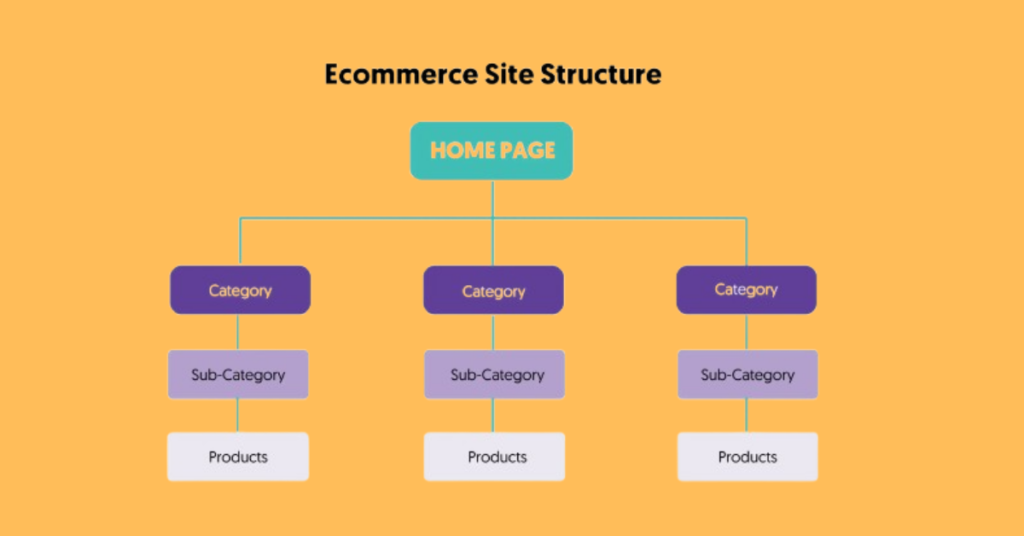
Rules for a clean site structure:
- Every page should be reachable within 3 clicks from the homepage.
- Use breadcrumbs on every page. They help users navigate and help Google understand your site hierarchy.
- Keep your URLs short and descriptive. For example: yourstore.com/mens-shoes/running-shoes/nike-air-zoom is far better than yourstore.com/product?id=4872.
- Avoid creating too many sub-categories. Keep it simple and logical.
A clean structure means Google can efficiently crawl your entire store, which means more of your pages get indexed and ranked.
Tip 3: Optimize Every Product Page for On-Page SEO
Your product pages are the most important pages on your store. They are where customers land, read, and decide to buy. They also need to be optimized for search engines at the same time.
Here is a checklist for optimizing every product page:
Title Tag
- Include the primary keyword naturally.
- Keep it under 60 characters.
- Example: “Nike Air Zoom Pegasus 40 | Men’s Running Shoes “
Meta Description
- Write a compelling 150–160 character summary.
- Include the keyword and a clear benefit.
- Example: “Shop Nike Air Zoom Pegasus 40 men’s running shoes in Pakistan. Lightweight, responsive, and built for speed. Free delivery on orders above Rs. 2,000.”
Product Title (H1)
- Use one H1 per page that includes the main keyword.
- Be specific: include size, color, model, or variant where relevant.
Product Description
- Write unique descriptions for every product. Never copy from the manufacturer.
- Write for humans first, search engines second.
- Cover: what the product is, who it is for, key features, and why someone should buy it.
- Aim for at least 300 words on important product pages.
Image Alt Text
- Every product image should have descriptive alt text.
- Example: alt=”Nike Air Zoom Pegasus 40 men’s running shoes blue” not alt=”img001″.
URL Structure
- Keep it clean: /running-shoes/nike-air-zoom-pegasus-40
- No special characters, no unnecessary parameters.
Tip 4: Fix Duplicate Content Before It Hurts Your Rankings
Duplicate content is one of the biggest SEO problems for e-commerce stores and most store owners do not even know it is happening.
Here is where duplicate content typically comes from in online stores:
- Product variants: When you have the same product in different colors or sizes, each variant often gets its own URL. Google sees them as separate but nearly identical pages.
- Filter and sorting pages: When a user filters products by price or color, your platform often creates new URLs like /shoes?color=red&sort=price. These pages are usually duplicates.
- Pagination: Pages like /category/page=2 can cause thin content issues.
- Manufacturer descriptions: If you copy product descriptions from the supplier, hundreds of other stores have the same text.
How to fix duplicate content:
- Use canonical tags. A canonical tag tells Google which version of a page is the “main” one. For product variants, point all variants back to the main product page.
- Example: <link rel=”canonical” href=”https://yourstore.com/shoes/nike-air-zoom” />
- Use noindex on filter pages. Tell Google not to index URL parameters created by filters and sorting.
- Write original product descriptions. This is non-negotiable. Unique content is one of the biggest competitive advantages you can have.
Tip 5: Add Schema Markup to Your Product Pages
Schema markup is a type of code you add to your pages that gives Google extra information about your content. For e-commerce stores, it is one of the most powerful and most underused SEO tools available.
When you add Product Schema to your pages, Google can display rich snippets in the search results. These look like this:
⭐⭐⭐⭐⭐ 4.8/5 (243 reviews) | Rs. 3,499 | In Stock
These rich snippets take up more space in search results, they look more trustworthy, and they get significantly higher click-through rates than plain blue links.
Types of schema to add to your e-commerce store:
| Schema Type | What It Does |
| Product Schema | Shows price, availability, and ratings in search results |
| Breadcrumb Schema | Shows your site path in the search result |
| Review/Rating Schema | Displays star ratings under your listing |
| FAQ Schema | Shows expandable Q&A directly in Google results |
| Organization Schema | Tells Google about your business |
Most e-commerce platforms like Shopify and WooCommerce have plugins or built-in tools that generate schema automatically. If you are on a custom platform, you will need to add JSON-LD code manually or use Google Tag Manager.
Always test your schema using Google’s Rich Results Test tool to make sure it is implemented correctly.
Tip 6: Optimize Your Category Pages — They Are Your Most Powerful SEO Asset
Most store owners put all their SEO effort into product pages and completely ignore category pages. This is a huge mistake.
Category pages rank for high-volume, high-intent keywords like “men’s running shoes,” “office furniture Pakistan,” or “women’s formal dresses.” These pages can bring in massive amounts of organic traffic.
Here is how to properly optimize your category pages:
Write a unique category description
- Add 150–300 words of descriptive text at the top or bottom of the category page.
- Include the primary keyword naturally.
- Explain what the customer will find, why your selection is the best, and what to consider when choosing.
Optimize the H1 and title tag
- Use the primary keyword in the H1 heading.
- Example: H1 = “Men’s Running Shoes” | Title Tag = “Men’s Running Shoes in Pakistan | Shop Online “
Add internal links
- Link to your top-selling or featured products within the category text.
- Link to related categories using descriptive anchor text.
Use breadcrumbs
- Make sure breadcrumbs are visible and clickable on every category page.
Handle pagination correctly
- Do not let paginated pages (page 2, page 3) compete with your main category page.
- Use a rel=”canonical” pointing to the main category page, or use the ?page=2 parameter in Google Search Console to signal it as a paginated series.
Tip 7: Make Your Store Fast and Mobile-Friendly
Page speed and mobile experience are not just user experience factors; they are confirmed Google ranking signals. In 2026, Google’s Core Web Vitals are more important than ever.
Core Web Vitals you need to know:
| Metric | What It Measures | Good Score |
| LCP (Largest Contentful Paint) | How fast does the main content load | Under 2.5 seconds |
| FID / INP (Interaction to Next Paint) | How quickly your page responds to user clicks | Under 200ms |
| CLS (Cumulative Layout Shift) | How stable the page layout is (no jumping elements) | Under 0.1 |
How to speed up your e-commerce store:
- Compress your images. Large images are the number one cause of slow stores. Use the WebP format and compress all images before uploading. Tools like TinyPNG or Squoosh work great.
- Use a fast hosting provider. Shared hosting is fine for small blogs, but an e-commerce store needs reliable, fast servers.
- Enable browser caching and use a CDN. A Content Delivery Network (CDN) serves your store from servers closer to your visitors’ locations.
- Remove unnecessary apps and plugins. Every extra plugin adds load time. Only keep what you truly need.
- Lazy load images. Only load images when the user is about to scroll to them.
For mobile:
- Your store must look and work perfectly on smartphones.
- Buttons must be large enough to tap easily.
- Text must be readable without zooming in.
- The checkout process must be smooth on a small screen.